Book a demo

Features

Everything a hotel needs to sell its rooms and run its desk

One system from the guest's first search to the folio at check-out: the booking engine on your website, the PMS at your front desk, and the reports your accountant asks for.

Booking engine & widget

Direct bookings on your own website

Your guests search, choose a room and book without leaving your site. The engine is built to be finished on a phone by someone who has never seen it before.
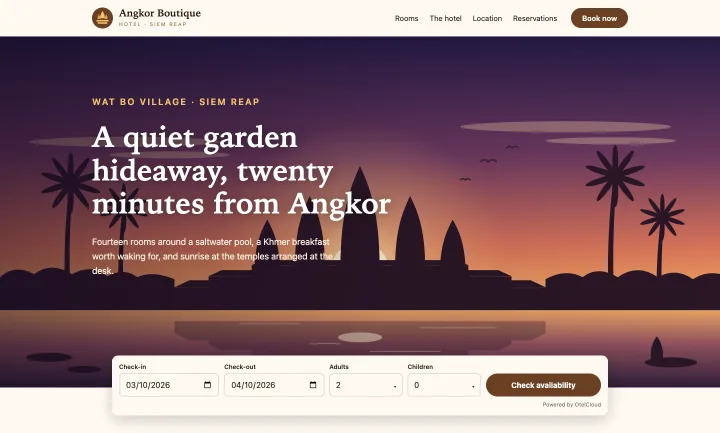
The OtelCloud search bar embedded at the foot of a sample hotel website's front page
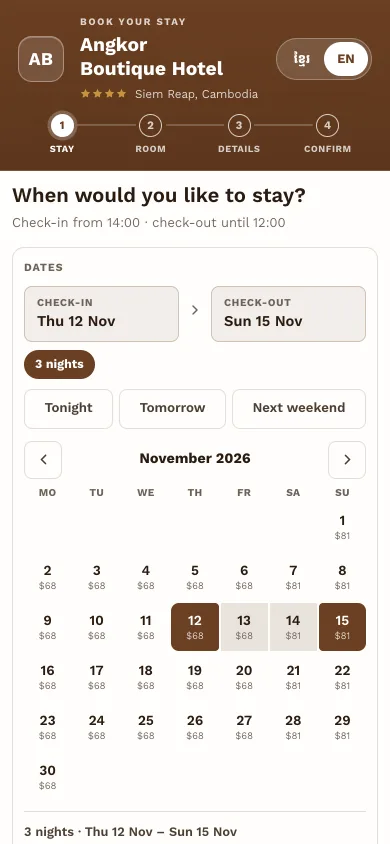
The booking engine's calendar on a phone
The search bar on a sample hotel website, and the booking engine on a phone.

On your website

  • A search bar embedded in your page with one line of script
  • A popup on your existing Book buttons
  • A full booking page, with your own address such as book.yourhotel.com
  • An iframe for website builders that do not allow scripts

Looks like your hotel

  • Your colours, logo, fonts, corner style and buttons
  • Light or dark, to match your site
  • Set up by our team when you start, with no code for you to edit

For the guest

  • Prices per night on the calendar, closed and sold-out nights marked
  • Room types with photos, amenities and every rate plan
  • The cancellation policy shown before booking
  • A confirmation e‑mail, and a secure link to view or cancel

Front desk

A front desk that runs on one system

Everything the desk does in a day, from the morning's arrivals to the last check-out, on a tablet at the desk or a computer in the office.
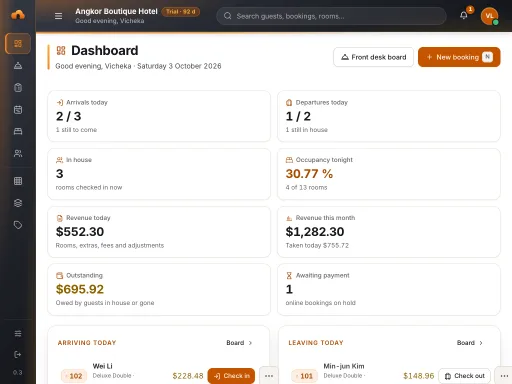
The OtelCloud dashboard on a tablet at the front desk
The dashboard on a 1024 × 768 tablet.

The day

  • Dashboard: arrivals, departures, in house, occupancy, revenue, money owed
  • Front desk board for today or any other date
  • Check-in and check-out, early arrivals and late departures

Reservations

  • Web, walk-in and phone bookings in one list
  • Filter by status, dates, source and room type, or search by name
  • Change dates, room type, plan or room, with the price worked out again

Rooms and guests

  • A tape chart calendar: drag a booking to another room
  • Room status for housekeeping: clean, dirty, out of order, on a board that updates by itself on every device
  • A guest list that keeps who agreed to hear from you

Guests & staff

Know your guests, and who did what

A guest's profile beside the booking, staff accounts that each see only their own work, and a trail of every change.
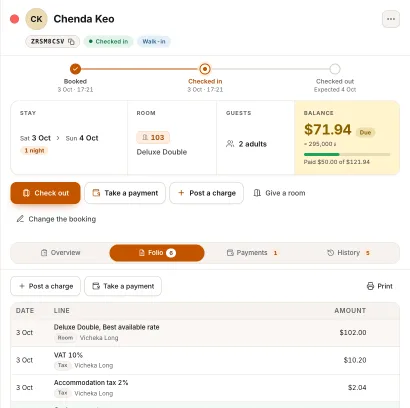
A guest's reservation drawer at the front desk, with the folio and the balance in dollars and riel

Guests

  • Open a guest's profile in a side drawer, from the Guests list or from a booking
  • A search in the top bar finds a guest or a booking as you type
  • Searchable country and phone-code pickers on every guest
  • A guest list that keeps who agreed to hear from you

Staff and roles

  • Hotel admin, front desk, accountant and housekeeping: each sees and changes only what the job needs
  • Everyone chooses their own password at the first sign-in
  • The back office in Khmer or English, per person
  • A light, dark or Liquid Glass look, as each person likes

A trail you can trust

  • An audit log of staff changes: who changed what, and when
  • A folio line is never edited: a mistake is reversed by a new line
  • Side drawers you can widen by their left edge

Set-up & taxes

From an empty hotel to ready to book

Our team sets your hotel up with you, and the PMS keeps a short list of what is left, so nothing is forgotten.
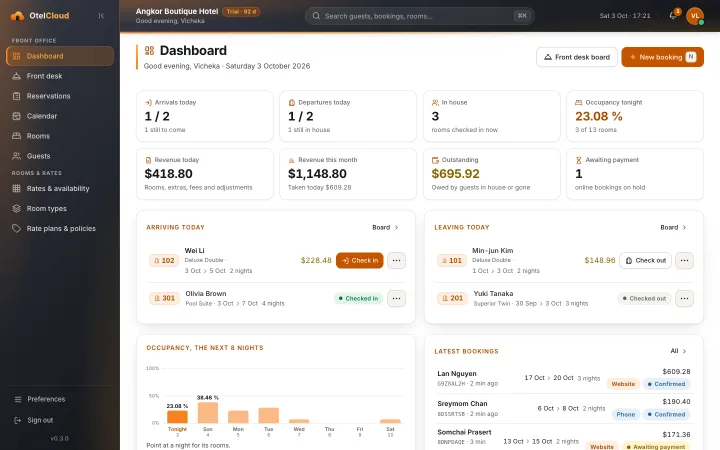
The OtelCloud dashboard at the front desk: arrivals, departures, in house, occupancy and revenue

A guided start

  • A Set up your hotel card lists what is left: rooms, rate plans, photos and the tax number
  • It goes away by itself when the work is done
  • One tap gives a new room type its Standard rate plan
  • Choose what you run: hotel, resort, cottages, villas, a private villa or a dorm sold bed by bed, and the screens say room, villa, cottage or bed

Rooms and photos

  • Type room numbers the way you say them: 101-110, 201-205, 301A
  • The floors are worked out from the numbers, and you can correct them
  • A photo manager for the hotel and for each room type

Cambodian taxes

  • The Cambodian standard in one tick: accommodation tax 2 % and VAT 10 % on top of it
  • A switch on each tax line says whether it is worked out on the price plus the taxes before it
  • Every tax line has its name in Khmer and in English

Rates & availability

Prices and availability you can change in seconds

A calendar grid for every room type: the price, the rooms left to sell, the minimum stay and open or closed, night by night.
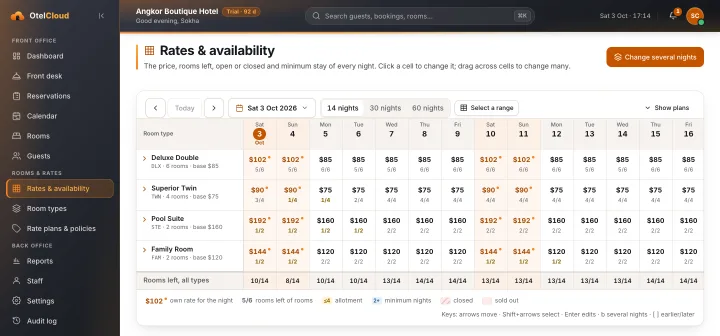
The rates grid for fourteen nights, with each night's price and rooms left

The grid

  • Click a night to change it, or select a range of nights and room types
  • Change chosen weekdays across a date range in one edit
  • Rooms left and closed nights read at a glance

Plans and policies

  • Rate plans on each room type, such as room only, bed and breakfast, non-refundable
  • A cancellation policy on every plan, with its fee

Payments & folio

Every payment on the guest's folio

Guests pay at the hotel. Your staff record each payment against the stay, and the balance is always in front of them.

A guest's folio at the front desk: room night, VAT, accommodation tax, a cash payment and a minibar charge, with the balance in dollars and riel

At the desk

  • Cash and card payments recorded against the stay
  • Refunds recorded as their own lines, with the reason
  • A balance that updates as charges and payments are posted
  • OtelCloud never holds your guests' money

On the folio

  • Dollars and riel, with the riel amount shown beside the dollar
  • A folio of room nights, taxes, extras, payments and refunds
  • A first-night cancellation or no-show fee carries its own taxes
  • Lines are never edited or deleted: a mistake is reversed by a new line

Promotions & loyalty

Offers and a reason to come back

Give guests a promo code or an automatic offer for the nights you choose, and reward the ones who return with points. Every price is worked out the same way on the booking page and at the desk, so the guest never pays more than they were shown.

Promotions

  • A code the guest types, or an offer that applies by itself
  • A percentage or an amount off each night, before tax
  • Choose the nights it covers, the days it can be booked, the minimum stay and the room types
  • Limit how many times it can be used, or keep it for returning guests
  • A link such as your-booking-page/?promo=SONGKRAN10 opens with the code already applied

Loyalty points

  • Guests earn points at check-out on the room price
  • Returning guests spend them on their next booking, online or at the desk
  • You set the rate, what a point is worth and how much of a room points can pay
  • A guest's points and history on their profile; add or take points by hand with a reason

Clear for the guest and the books

  • The booking page and the confirmation e‑mail show the price, the offer and the points taken off
  • Points online need the e‑mail and phone number on file to match
  • Off until you switch them on, one hotel at a time

Guest reviews

Ask every guest for a review, after they leave

A few hours after check-out, the guest gets a short message in Khmer or English with a link to your Google or TripAdvisor page. More reviews from real guests, without the front desk chasing them.

Asking

  • Sent by e‑mail, or on Telegram to guests who connected it from their booking page
  • In the guest's own language, with your hotel's name and contact details
  • You choose how many hours after check-out, from 1 to 72
  • Paste your Google review link, a Google Place ID or your TripAdvisor page once

Fair to the guest

  • Every guest is asked, not only the happy ones, and nothing is offered in return: Google's rules ask for exactly that
  • A guest is asked at most once every 30 days, and can ask not to be asked again
  • If something was not right, the message tells them how to reach you first

Seen in the back office

  • How many guests were asked and how many opened the link, over the last 90 days
  • Each request with its status, and the reason when a guest was not asked
  • Off until you switch it on, one hotel at a time

In-room guide

Replace the folder in every room with a code

A QR code in each room opens a page with the Wi-Fi, your house rules, menus, tours and phone numbers, in Khmer and English. No app to install and no folder to reprint when the menu changes.

What guests find

  • The Wi-Fi name and password, with a Copy button
  • Check-out time, house rules, breakfast and restaurant hours
  • Tours and transport with a link to book, and numbers to tap and call
  • Khmer or English, whichever the guest chooses

Ask the desk

  • Clean my room, extra towels, late check-out, report a problem, call me
  • Each request shows at the front desk with the room and a note; housekeeping sees them too
  • Pressing a button twice does not ring the desk twice

Yours to run

  • Write and reorder the entries yourself; hide one without deleting it
  • Print a sheet of room codes, with a Wi-Fi code beside each that joins the network at once
  • Replace a defaced code in one click: the old one stops working
  • Off until you switch it on, one hotel at a time

Maintenance

Know when every air-conditioner and pump is due

List your equipment once, give each piece the jobs that repeat on it, and OtelCloud tells you what is overdue before a guest finds a dead air-conditioner. Every job done goes into a log you can hand to an inspector.

What is due

  • Air-conditioners, pool pumps, fire extinguishers, lifts, generators, water heaters, smoke alarms and more
  • Jobs that repeat every few weeks, months or years, with a usual starting list you can change
  • A list of what is overdue, due this week and on schedule
  • A morning e‑mail to the hotel admins when something needs attention, and nothing on a quiet day

A log that stays true

  • Mark a job done with the day, who did it, what it cost and a note; the next date moves on by itself
  • Entries are never changed or deleted: a mistake is fixed by a correction kept beside the original
  • Save the log as a spreadsheet or print it for an inspection

Yours to run

  • You decide how often each job is needed: the starting list is a suggestion, not a rule from any authority
  • Housekeeping and the front desk see the list and mark jobs done; the hotel admin sets it up
  • Off until you switch it on, one hotel at a time

Marketing Wi-Fi

Turn guest Wi-Fi into a list of people you can reach

When a guest joins your Wi-Fi, their phone opens a page in your hotel's name and colours. They sign in with Telegram or a phone number, get online, and you keep their contact for the next stay.

For the guest

  • A short sign-in page in Khmer or English, with nothing to install
  • Telegram or a phone number; the box to receive offers is never ticked for them
  • You can let guests connect without signing in, if you prefer

For your hotel

  • Works with a MikroTik hotspot router: the router sends guests to the page, and lets them through when they are done
  • A contact list you own, with search and a spreadsheet to save, marking the people who have also booked with you
  • One Telegram message a day to everyone who opted in: a dinner promotion, a return offer, a festival greeting

Respectful by design

  • Only people who ticked the box, and only on Telegram, are sent offers; /stop ends them at once
  • Take anyone off the list, or erase them and their sign-ins, in one click
  • Off until you switch it on, one hotel at a time

Reports

Money first, then occupancy

Reports start where your accountant starts: what was earned, what was paid, and what is still owed.
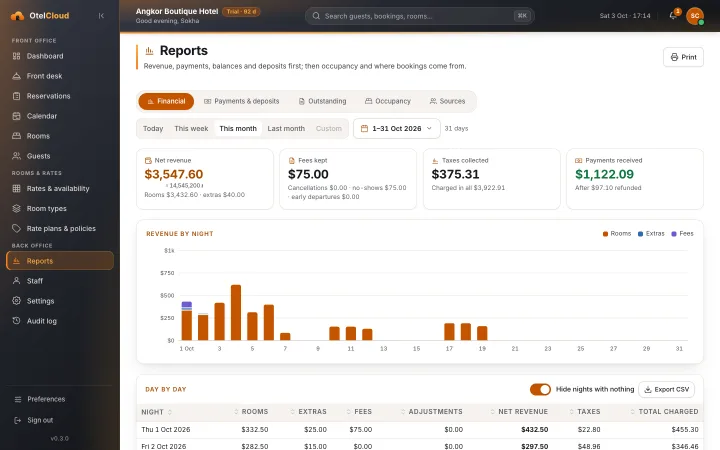
The financial report: net revenue, fees, taxes and payments received, with revenue by night as a bar chart

Financial

  • Net revenue by night: rooms, extras and fees
  • Payments by type, refunds and deposits taken
  • Taxes collected and balances still outstanding
  • Revenue by room type

Occupancy and sources

  • Occupancy by night, with average daily rate and RevPAR
  • Bookings, room nights and revenue by source: website, walk-in, phone, e‑mail
  • Today, this week, this month, last month or any period; print or export CSV

Khmer & English

In the language of the person using it

Khmer comes first, not as a translation added later. Every guest-facing word has its Khmer twin, and the back office switches language per person.
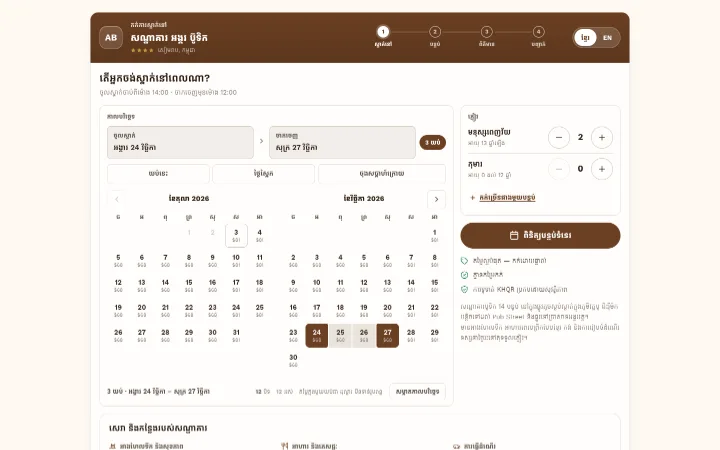
The booking engine in Khmer: the calendar with prices, guests and the button to check availability

Guests

  • The booking engine in Khmer or English, with one tap to switch
  • Room names and descriptions in both languages
  • Confirmation and cancellation e-mails in the guest's language

Staff

  • The whole back office in Khmer or English, chosen by each person
  • Khmer digits typed on a Khmer keyboard are read as numbers
  • Hotel dates and times in Cambodia's time zone

Security

Your hotel's data stays your hotel's

Every hotel on OtelCloud shares the platform and none can see another's data. These are the rules the system is built on.

Separated in the database

Every hotel's rows are fenced off by the database itself, not only by the screens, so one hotel's query cannot read another's.

Roles for every account

Hotel admin, front desk and accountant each see and change only what their job needs.

Strong password storage

Passwords are stored as argon2 hashes, never as the password itself.

An audit log

Changes made by staff are recorded: who changed what, and when.

Secure guest links

A guest opens their booking with a private link from their e‑mail, not with a guessable number.

No card data, no guest money

OtelCloud never stores card numbers and never holds a guest's money.

See it working, end to end

In a demo we book a room as a guest, then check the guest in at the desk.